CCS mode
For plans with carrier-calculated shipping
Shows rates in real time through Shopify’s carrier service, with a rich display: discount notes and surcharge breakdowns appear right under the shipping method name.

Kilarity Custom Shipping
Kilarity Custom Shipping is a Shopify app that brings shipping rates optimized for Japan to your checkout. About 150 inhabited remote islands are built in alongside every prefecture, with no postal-code management. Works on every Shopify plan.

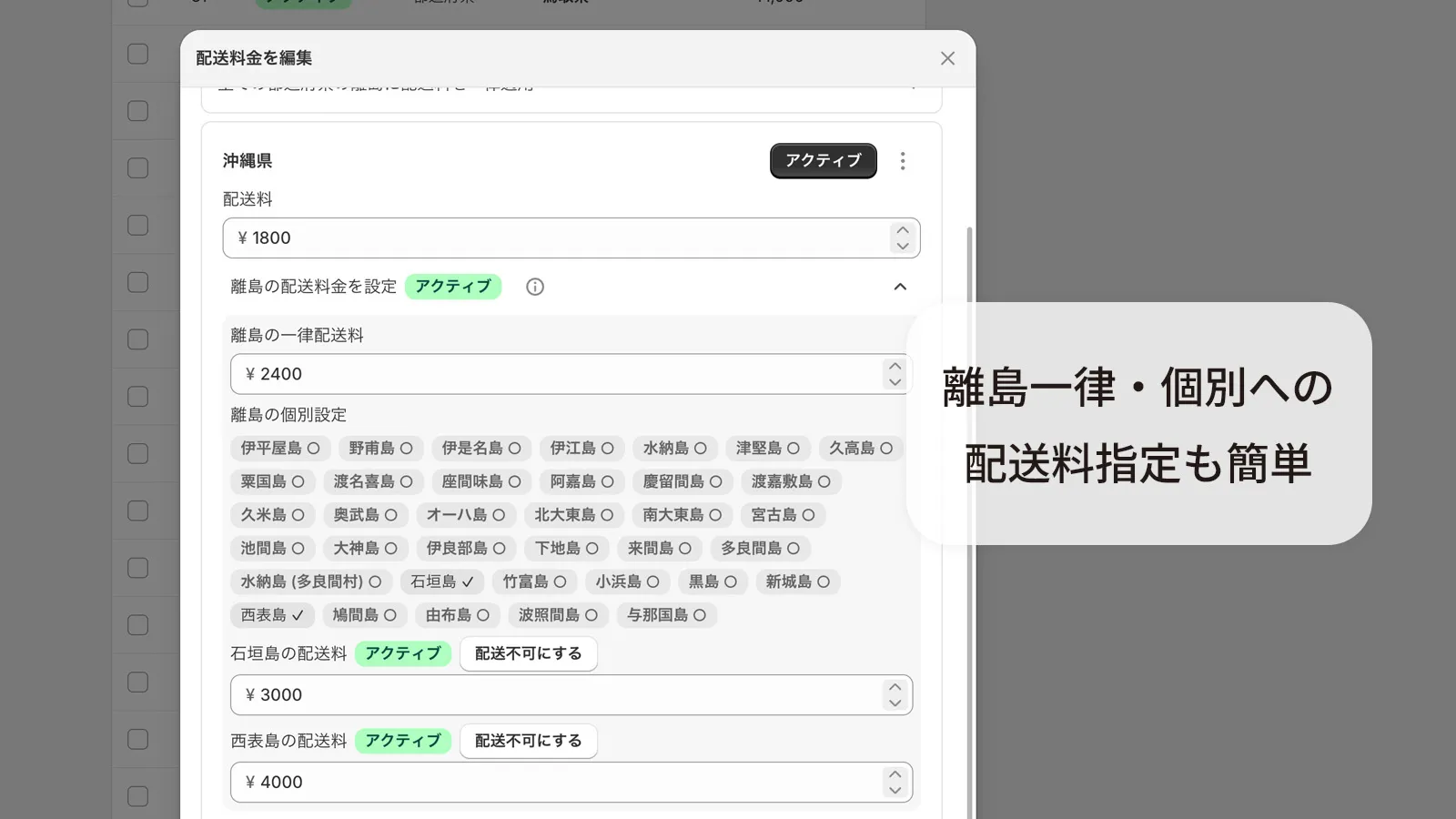
Island shipping usually means registering postal-code ranges by hand. Kilarity Custom Shipping ships with a built-in list of about 150 inhabited islands, from Okushiri off Hokkaido to Yonaguni in Okinawa. Just pick islands on screen, and the app detects island addresses automatically from your customer’s postal code.
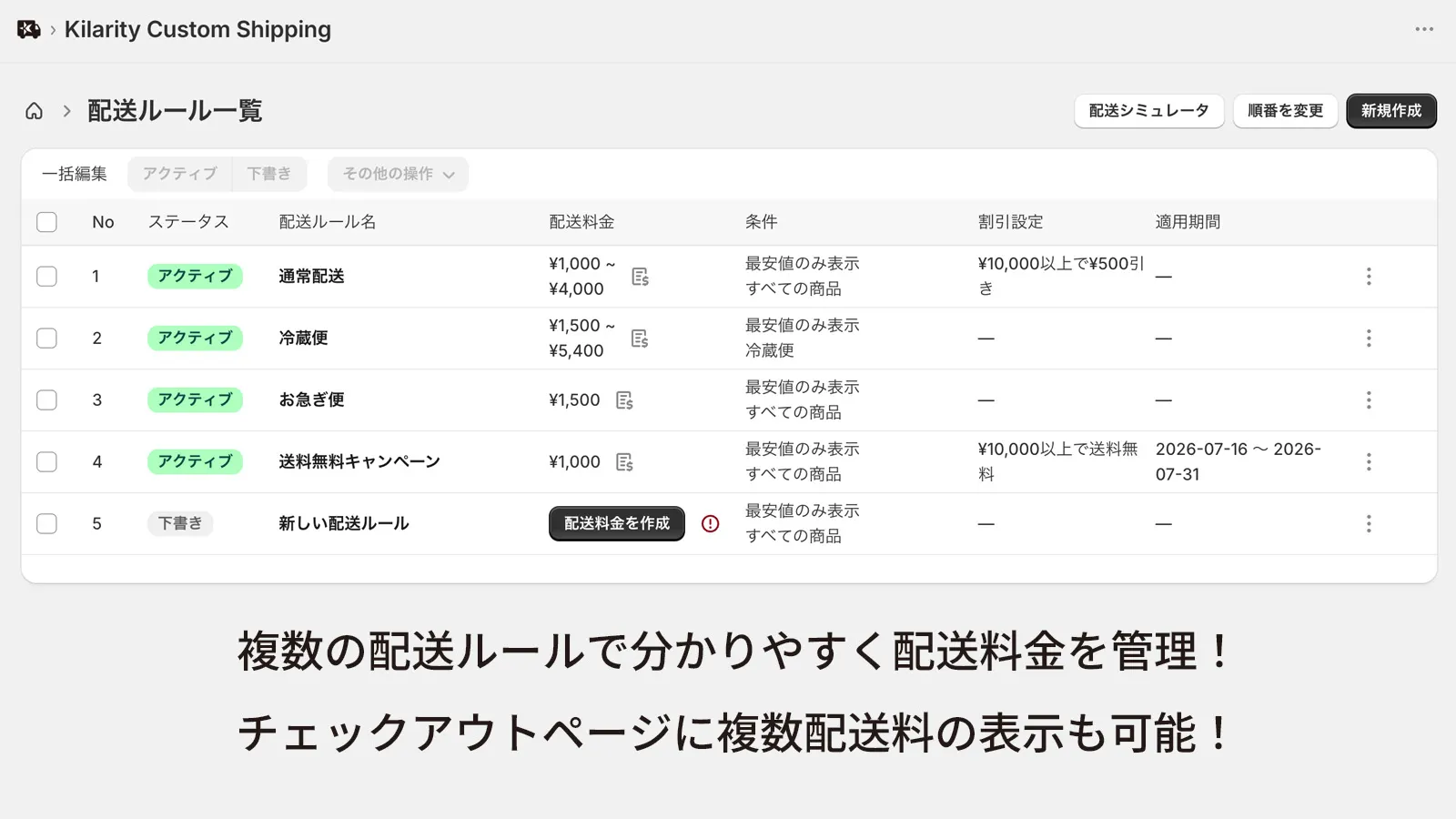
Attach dedicated shipping rules as conditions to product tags like "cold chain" or "oversized", and to product types or individual products as well. When a matching product is in the cart, the rule applies automatically, so cold-chain and large-item surcharges run themselves.
"Free shipping over ¥8,000", "50% off over ¥10,000", "¥300 off over ¥5,000". Set order-value thresholds with free, percentage or fixed-amount discounts. When the condition is met, an explanatory note appears on the shipping line at checkout automatically.
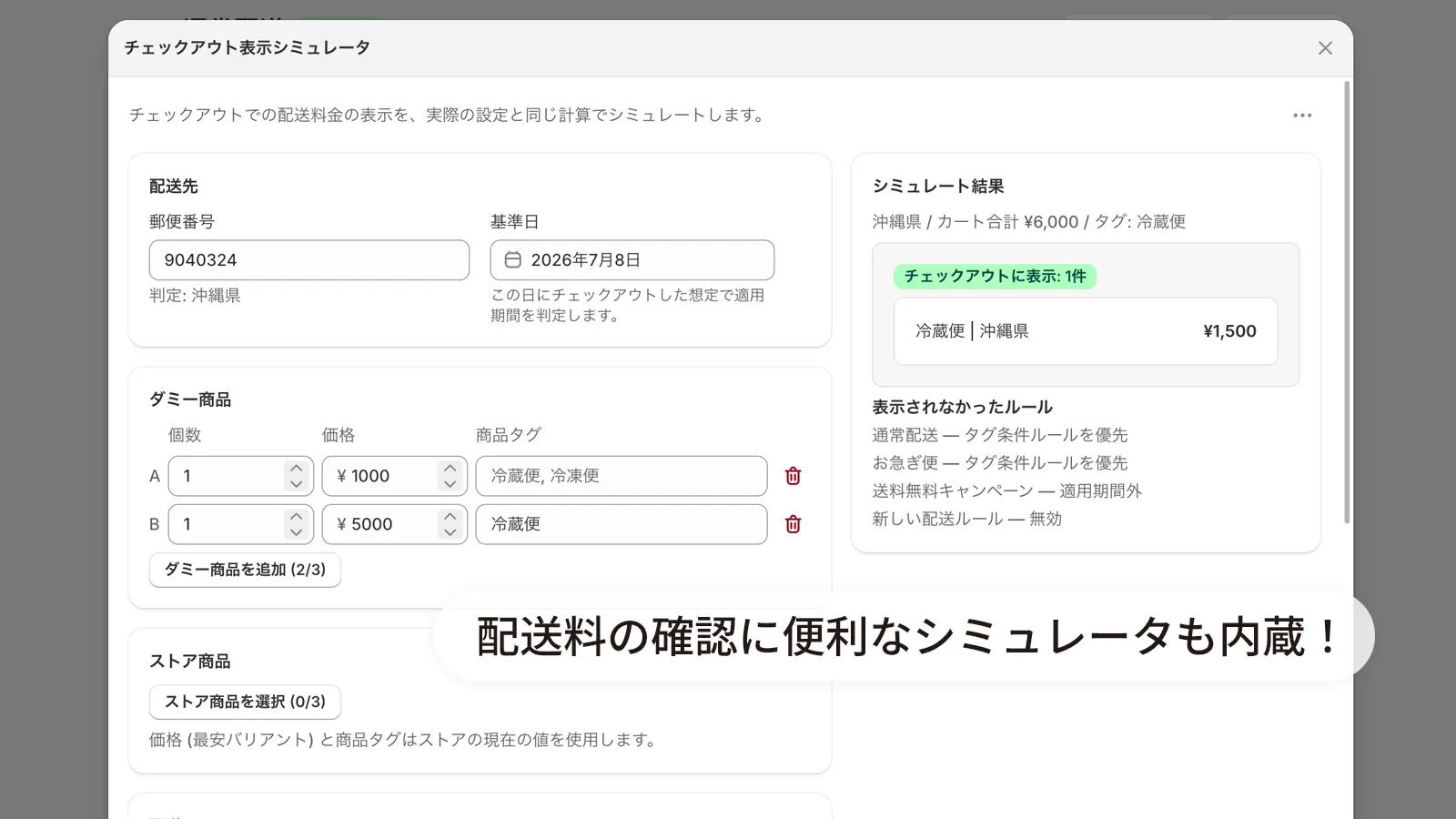
Enter a postal code, cart contents and a reference date to preview the exact rate that will appear at checkout, right in the admin. It runs the very same calculation as production, so you catch surprises before your customers do.
No carrier-calculated shipping (CCS) on your plan? No problem. Switch between two modes to match your store.
For plans with carrier-calculated shipping
Shows rates in real time through Shopify’s carrier service, with a rich display: discount notes and surcharge breakdowns appear right under the shipping method name.
For Basic and monthly Grow plans
The app syncs your shipping rules into Shopify’s shipping settings and adjusts checkout to the correct amount. Prices are exactly the same as CCS mode; only the display differs slightly (discounts appear with a strikethrough price).
Rules are built the same way in both modes. After upgrading your Shopify plan, switch to CCS mode in one click.
From rate setup to day-to-day operation. Every feature is available on every plan.
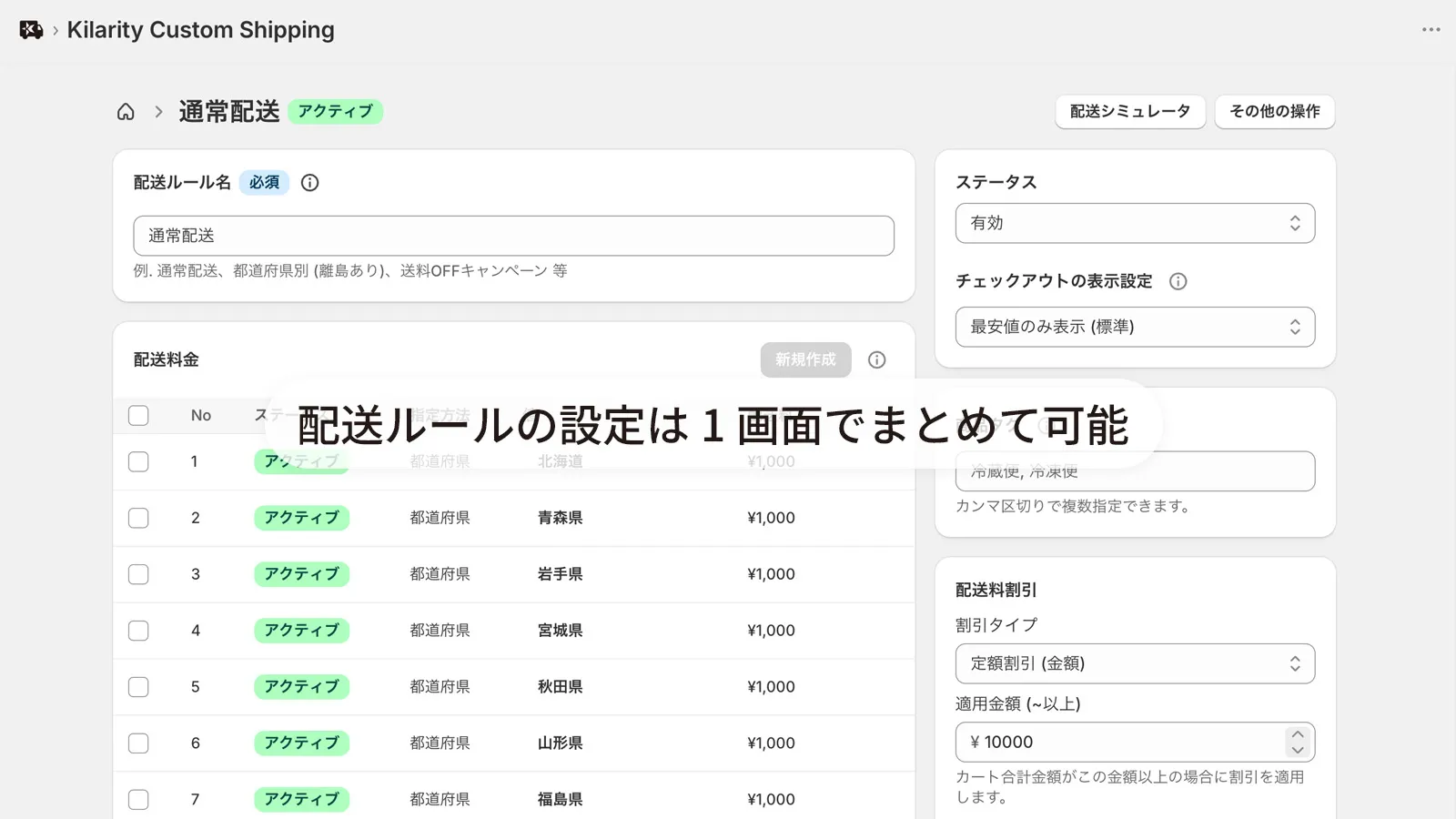
Set an individual rate for each of the 47 prefectures, including stepped surcharges for distant regions.
From the built-in island list, set a flat rate, per-island rates or no-ship zones, without postal codes.
Apply dedicated rules by product tag, product type or individual product.
Leave the mainland price empty to create rules that apply only to island addresses.
Free, percentage or fixed amount, with promo text shown automatically.
Set start and end dates; rules outside their window never appear at checkout.
Show only the cheapest rate, only the highest (to avoid undercharging on mixed carts), or list every matching rate.
Reorder rules to control the checkout order and tie-breaking between equal rates.
Preview the checkout display before going live, using the production calculation.
Save up to 10 frequently used cart setups for quick re-verification.
Clone a rule and tweak only the differences, or toggle rules on and off individually.
Registered with Shopify on install. No manual setup for the merchant.
Ask Shopify's AI assistant to look up shipping rules, estimate checkout rates, and diagnose setup status.
Every feature is documented in detail in the 14-chapter manual. Read the manual (Japanese)
Install Kilarity Custom Shipping from the Shopify App Store.
Enter prefecture and island rates and conditions on screen to assemble your shipping rules. No code required.
Check the checkout display with the simulator, then apply it by following the setup guide.
* All amounts are examples. Set your own rates freely per store.
Tokyo at ¥1,000, adding ¥200 for each farther prefecture. Hokkaido and Okinawa can be priced separately.
Keep the mainland at a flat ¥800 and charge ¥1,500 only for island addresses. Simple pricing with island coverage.
Within Okinawa, charge ¥1,200 for the main island and ¥1,800 for Ishigaki. Rates vary island by island.
Mark only the islands your carriers cannot reach as out of delivery range.
Switch to a cold-chain rate only when a "refrigerated" tagged product is in the cart.
Add ¥500 for each "oversized" tagged item. More large items, correctly higher shipping.
Shipping drops to ¥0 above the threshold, with a "Free shipping over ¥8,000" note shown automatically.
Take ¥500 off carts over ¥10,000. Split Hokkaido and Okinawa into a separate rule to exclude just those two.
Percentage discounts are supported too, so campaigns like 50% off are easy to set up.
Show two rates to the same destination and let customers choose by delivery speed.
Free shipping only from 12/1 to 12/25. When the window ends, normal rates return automatically.
Switch to new rates automatically from 4/1. No late-night settings work required.
Simple monthly pricing. Every plan includes all features; the only difference is how many shipping rules can be active at once. A single rule can hold rates for every prefecture and island, so even a few rules go a long way.
$6 / mo
$12 / mo
$24 / mo
The running numbers count shipping rules, so you can see how far each plan takes you.
Starter Up to 3 rules
Standard Up to 6 rules, on top of the Starter set
Advanced Up to 12 rules, on top of the Standard set
All of them. Even on Basic or monthly Grow plans without carrier-calculated shipping (CCS), fallback mode shows the same shipping amounts at checkout. See the manual chapter "Using on the Basic plan" for details (Japanese).
Yes. All features are free to use on development stores.
No, every plan includes all features (as of July 2026). Plans differ only in how many shipping rules can be active at once.
Yes, every paid plan comes with a 14-day free trial. On development stores you can use every feature for free with no time limit.
This app’s shipping rates won’t appear at checkout. After you set a Shopify plan, please also switch the app to a paid plan.
Feedback is very welcome! If there’s something you’d like built, please reach out via Kilarity’s Contact, or reply / DM the developer, Shingaki, on X.
If you notice anything that looks like a bug, don’t hesitate to reach out via Kilarity’s Contact, or reply / DM the developer, Shingaki, on X. We’ll work to resolve it quickly.
Questions or requests? Feel free to reach out! Contact / Developer on X (@RyuyaShingaki)
Kilarity Custom Shipping keeps evolving. Upcoming updates are published on our public development roadmap.